Workflows
Last updated at Apr 23, 2024
Cycles
The Buri Engineering Team works in 8-week cycles. There are typically six (6) cycles in a year. This fixed pattern serves to: give us an internal sense of urgency, work as a scope hammer to keep projects from ballooning, and provide a regular interval to decide what we’re working on.
Cycles should be labeled by their year and number for the year. For example, the first cycle of the year 2024 should be labeled “Cycle 24-1”, the second cycle labeled “Cycle 24-2”, the third cycle labeled “Cycle 24-3”, and so on.
Given that the first cycle of the year (Cycle YY-1) starts at the first week of January, the last cycle (Cycle YY-6) will end sometime in the beginning of December. Since there are only a few weeks left until the end of the year, no new cycle will be started until the following year. This also means that no new releases will be scheduled for December. This month will be used to refactor code, do comprehensive testing, and fix remaining bugs, just in time for Christmas 🎄.
The first six (6) weeks of a cycle are for development and are called Dev Weeks. The last two (2) weeks of a cycle are for pre-production testing and fixing bugs found during testing. This last two (2) weeks of the cycle is called Cooldown, since it is when we implement a code freeze, deal with bugs and smaller issues, and do final preparations for the cycle’s release.
For example, here is a diagram showing three (3) consecutive 8-week cycles:
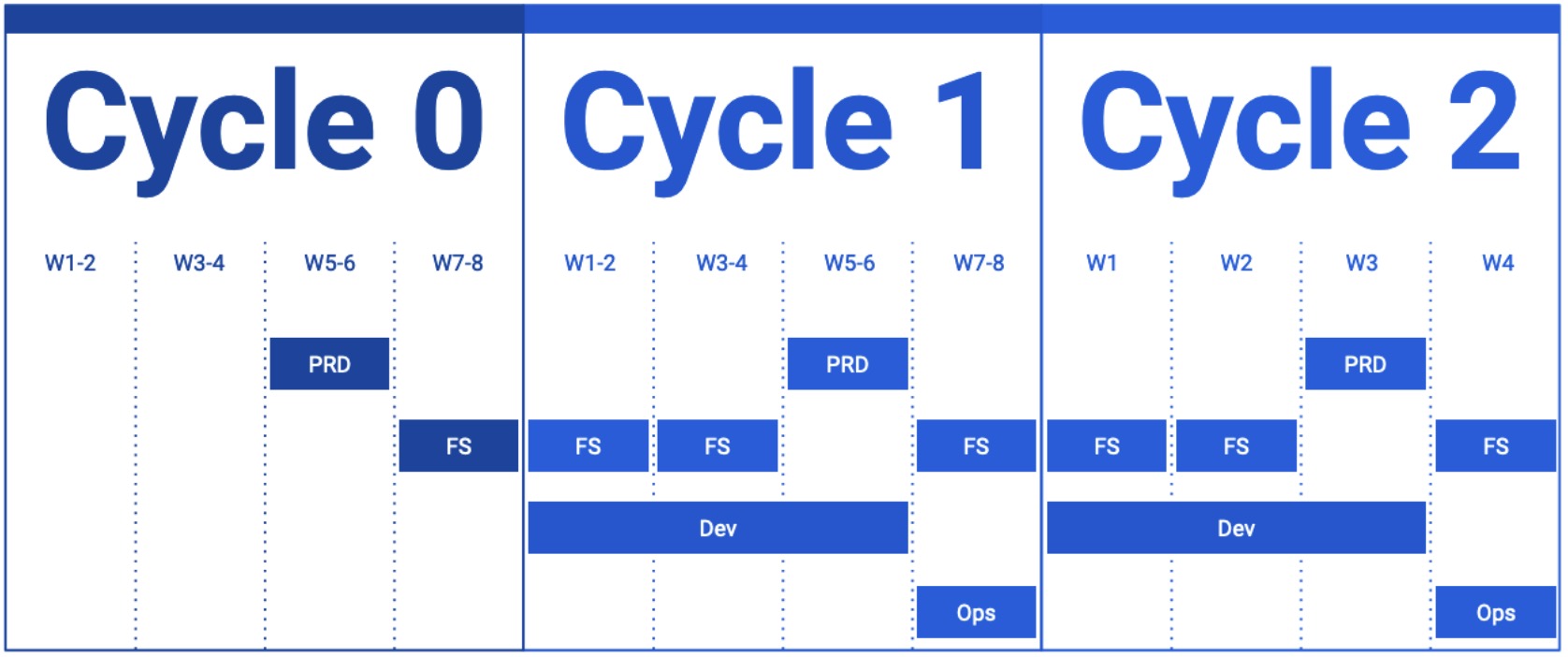
In terms of documentation, Weeks 5 and 6 of the current cycle should be used to create and finalize any new PRDs that are slated to launch in the next cycle. The team should start PRDs on Week 5. Week 6 should be used for reviewing and revisions so that by Week 7, PRDs are finalized and FS and UI/UX can be created in time for the next cycle.
It is recommended that new PRD’s are started on Week 5 of a cycle so that it will be ready for launch by the next cycle. This allows Team Leads and B UI to start on the related FS and UI/UX.
FS and UX/UX should also be in sync and finalized as soon as possible but not later than four (4) weeks before the scheduled release. For example, if a project is scheduled to release by the end of the current cycle, all FS and UI/UX of the project should be in sync and finalized by week 4 of the current cycle. This gives developers at least two (2) development weeks to implement the features described in the FS and UI/UX.
Developers should create and update related API docs and How-To docs during the Dev Weeks, as they are developing and implementing the features.
Project Phasing
The scope of a project is determined by the amount of requirements and its corresponding features. To make sure that the team is able to implement the features of a project, proper project phasing must be set.
Project phasing is essentially determining how many cycles a certain project’s requirements can be completed. A project may only need one (1) cycle to complete while bigger projects may need two (2) or more cycles to finish. A big project may be divided into phases, where a certain number of requirements will be completed per phase, and each phase is completed in one (1) cycle.
In terms of documentation, phases should be defined in a project’s specific PRD.
Requirements Commitment
To make sure that the team is able to implement the features of a project, proper requirements commitment must be defined.
A requirement must be defined with one of two levels of commitments, Required and Recommended:
- Required - A requirement that must be completed within a cycle.
- Recommended - A requirement that may be completed within a cycle if time permits (This is different from backlog, tasks that have missed their deadlines, or advanced work, work scheduled for future cycles).
Note that each requirement of either level, required or recommended, must be feasible to complete in one (1) cycle.
In terms of documentation, requirement commitments must be set by Team Leaders. Requirement commitments should be defined in the Weekly Team Updates and relevant FS’s.
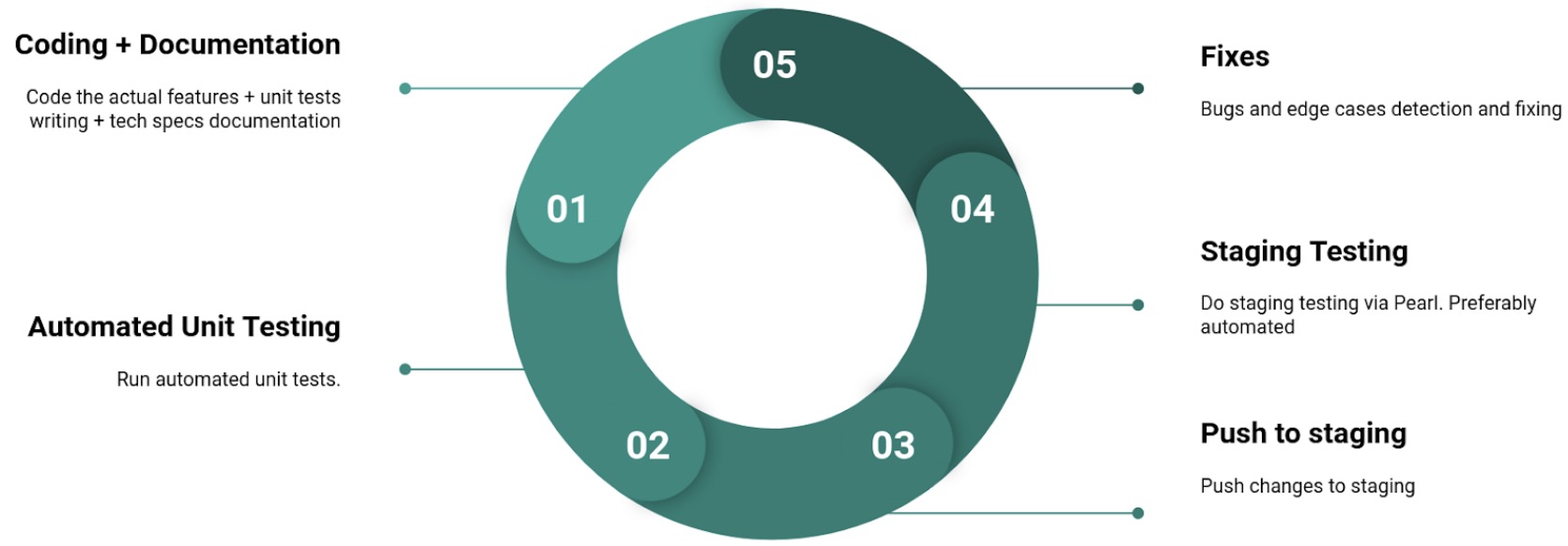
Development Pattern
Issue Tracking Tools
Phabricator
Phabricator is a software development management tool currently used by B Progs. The team uses Phabricator for its task and bug tracking tool (called Maniphest). For every feature request, bug fix, and generic task, a Maniphest task is created.
The self-hosted Phabricator instance of Buri can be visited here: https://phabricator.buri.dev/.
Mattermost
Mattermost is a software development management tool currently being explored by B Progs.
The self-hosted Mattermost instance of Buri can be visited here: https://mattermost.buri.dev.
Task Types
Feature Requests
These tasks are done to create new functionalities, improvements, or changes to an existing product.
Feature requests are tracked by creating a task in Phabricator.
The typical workflow of a Feature Request task goes like this:
- A feature is proposed by a developer, usually from the requirements stated in a Functional or Technical Specification document.
- A task is created, usually by a Team Lead, in Phabricator to track this feature and is given a descriptive title.
- The task is assigned by the author to a developer for implementation.
- The task is reassigned back to the author if the developer has any clarifications about the task.
- The task is assigned to the developer once clarifications have been made about the task.
- The task is assigned to the QA tester by the developer once related changes have been pushed to the Staging environment.
- The task is assigned back to the developer if the QA tester encounters any issues in Staging.
- The task is assigned to the QA tester again once the issues have been resolved in Staging.
- The task is assigned to the developer once the QA tester has verified the fixes in Staging.
- The task is assigned to the QA tester once the developer has pushed changes in the Preproduction environment.
- The task is assigned back to the developer if the QA tester encounters any issues in Pre Production.
- The task is assigned to the QA tester again once the issues have been resolved in Pre Production.
- The task is assigned to the developer once the QA tester has verified the fixes in Pre Production and the changes are ready to be pushed to Production.
- The task is assigned to the QA tester once the developer has pushed changes in the Production environment.
- The task is assigned to Operations Support to signal the creation of related articles.
Bug Fixes
These tasks are done to make updates or changes to existing software to address and resolve issues or problems, also known as bugs. Bug fixes aim to correct unintended errors or flaws in the software’s code that can cause it to behave unexpectedly or incorrectly.
Bug fixes are tracked by creating a task in Phabricator.
The typical workflow of a Bug Fix task goes like this:
- A task is created, usually by the person who first encountered the bug, in Phabricator to track this bug.
- The task is given a descriptive title and the following details about the bug are given: description of the bug, steps on how to reproduce the bug, expected behavior of the related feature, and what happened instead when trying to use the feature.
- The task is assigned by the author to a developer for fixing.
- The task is reassigned back to the author if the developer has any clarifications about the task
- The task is assigned to the developer once clarifications have been made about the task.
- The task is assigned to the QA tester by the developer once related changes have been pushed to the Staging environment.
- The task is assigned back to the developer if the QA tester encounters any issues with the fix pushed in Staging.
- The task is assigned to the QA tester again once the issues have been resolved in Staging.
- The task is assigned to the developer once the QA tester has verified the fix in Staging.
- The task is assigned to the QA tester once the developer has pushed changes in the Preproduction environment.
- The task is assigned back to the developer if the QA tester encounters any issues in Pre Production.
- The task is assigned to the QA tester again once the issues have been resolved in Pre Production.
- The task is assigned to the developer once the QA tester has verified the fixes in Pre Production and the changes are ready to be pushed to Production.
- The task is assigned to the QA tester once the developer has pushed changes in the Production environment.
Generic Tasks
A generic task is a task that does not fall into the category of either a Feature Request or a Bug Fix. An example of this task is a request for a report or collection of data.
The typical workflow of a Generic Task goes like this:
- A task is created by the person who is requesting the task, usually something that requires a specific output (ex. A CSV file, PDF, link to a document, etc).
- The task is given a descriptive title.
- The task is assigned to the specific person who can perform the task, usually the person who has access to the tools or data needed to create the required output.
- The task is assigned back to the author once the output has been completed.
Maintenance of Deployments
See Deployment Maintainers List.
Outline
- Introduction
- Direction
- Communication
- Teams
- Documentation
- Workflows