Documentation
Last updated at Apr 23, 2024
Document Types
Engineering Handbook
This Engineering Handbook is a documentation of all the important processes and workflows of the Buri Engineering Team.
See Engineering Handbook.
Minutes of the Meeting
Minutes, also known as minutes of meeting (abbreviation MoM), are the instant written record of a meeting or hearing.
Minutes must be taken for every meeting.
See ~[20YY.MM.DD] MoM Template.
Stand Up
The Stand Up document is a record of every team member’s daily tasks. This provides an asynchronous alternative to stand up meetings, which usually take only a few minutes but may not be suitable in practice given the large size of the team.
Every day, everyone fills up the stand up document with answers to the following questions:
- What did I work on yesterday
- What am I working on today?
- What issues are blocking me?
This is accomplished by responding to the Telegram Bot “Maikkorona Availability TimeBot Revamped” (https://t.me/maikkorona_time_bot), with the command /standup.
You can view the stand up entries of other B Progs members in the Daily Stand Up Google Sheet.
Weekly Team Updates
The Weekly Team Updates document is a record of every active project’s progress. The document includes a checklist per project of features and important related tasks of each active project. Team Leaders are expected to accomplish the progress of each checklist at the start of a project, usually at the beginning of a cycle. The Team Lead should also update the checklists if there is any change in the list of features for a project mid-cycle. An active project is a project which has requirements that are in development in the current cycle.
See Weekly Team Updates.
Project Requirements Document
The Project Requirements Document, or PRD, is a documentation of all the requirements of a specific client. It describes the problem of the client and the proposed solution. It also includes the key milestones and scheduled timeline of the project.
PRD’s are created if a project requires the development of new features. If a project’s requirements are already satisfied by existing features (see [PRD] Standard Use Case), a new PRD is not required.
The PRD must be finalized before launching (or putting in-cycle) of the project it describes. To finalize the PRD, all reviewers must be aligned with the problem, solution, and schedule plan details. Reviewers must give their “signature”, a green circle 🟢 or a red octagon 🛑 to indicate if they agree 🟢 or disagree 🛑 with the details. The reviewers include the members of the OGF and the author themself.
See [PRD] Template.
UI/UX Designs
UI/UX Designs, or UI/UX for short, are documents that illustrate the visual elements of a digital product that users interact with and visualize the layout and user interactions of specific features.
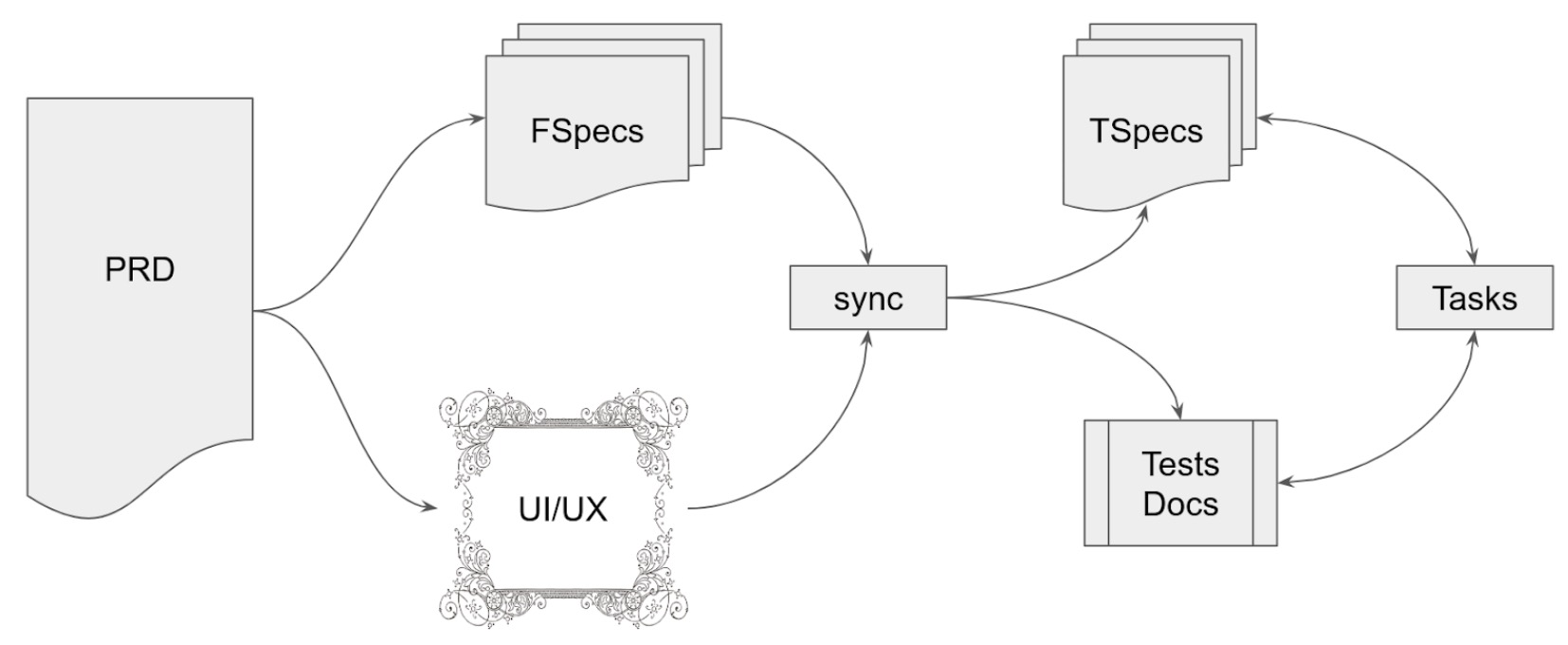
UI/UX designs should align with the details of the related Functional Specifications.
See Figma UI/UX.
Functional Specifications
Functional Specifications, or FS, are documents that outline what the product or system should do from a user’s perspective.
Key points about FS include: High-Level Overview: These specs provide a high-level overview of the product’s purpose and goals, focusing on the “what” rather than the “how.” Language: These specs are often written in non-technical language to make them accessible to stakeholders who may not have a technical background. User-Centric: Functional specs are written with the end-users in mind. They describe the product’s behavior and capabilities from the perspective of someone who will use the product. Features and User Interactions: FS detail the specific features, interactions, and use cases that the product should support. Use Cases: Use cases and user scenarios are often used to illustrate how the product will be used and how different features will work together.
FS should be in sync with the related UI/UX. The author should include direct links to the related Figma UI/UX feature.
See [FS] Template.
Technical Specifications
Technical Specifications, or TS, provide detailed technical information about how the product will be built and implemented. They are intended for the development and engineering teams who will be responsible for creating the product.
The format of TS will depend on the specific technical aspect of the document. For example, frontend TS may define details of screens and UI components while backend TS may define models and endpoints.
See [TS] Frontend Spec Template and [TS] Backend Spec Template.
Functional Specs vs Tech Specs
Essentially, FS answers the question of “what the product should do,” while TS answers the question of “how the product will be built to do what it should.” FS provides the context and goals, and TS provides the technical roadmap for achieving those goals.
API Documentation
API Documentation provides information and instructions on how to use and interact with an Application Programming Interface (API). These details include Authentication and Authorization, Endpoints and Routes, Request and Response Formats, Error Codes and Messages, Data Models, and Rate Limiting.
For the documentation tools, this can be created using framework tools or external platforms such as ReadMe, given your service uses the OpenAPI specification. This can also just be a Google Doc.
Developers are expected to create and update this document every time a new feature is added or changed. Preferably, once changes are pushed, their corresponding documentation also exists. This is to ensure that readers of this document will have an up-to-date reference and following this document will not break any integrations.
API docs should also include details of changes made even in staging or preprod environments. Make sure that it is indicated if certain features or changes are only available in staging or preprod.
API docs and How-To docs usually go hand-in-hand, where both documents are referred to when integrating the backend and frontend.
How-To Documentation
How-To Documentation offers step-by-step instructions for performing specific tasks. An example would be instructions on how to use and interact with a specific service’s API to execute a certain action.
This is in contrast to usage docs, which aim to give users a broader picture of a product’s capabilities, features, and general usage.
Similar to API docs, developers are expected to create and update the How-To docs every time a new feature is added or changed. Preferably, once changes are pushed, their corresponding documentation also exists. This is to ensure that readers of this document will have an up-to-date reference and following this document will not break any integrations.
How-To docs should also include details of changes made even in staging or preprod environments. Make sure that it is indicated if certain features or changes are only available in staging or preprod.
How-To docs and API docs usually go hand-in-hand, where both documents are referred to when integrating the backend and frontend.
The author should include the related direct links of the specific feature of the API docs it describes. For example, if an instruction describes the steps on how to create a resource using a specific endpoint, it should include the link to the endpoint section of the related API docs.
Incident Report
See [Incident Report] Template.
Documents Lifecycle
Outline
- Introduction
- Direction
- Communication
- Teams
- Documentation
- Workflows